How to Play Solitaire Without Advertisements
By Rajat Agarwal, Founder of Play Solitaire Gaming
Learn practical ways to enjoy solitaire without advertisements, from ad-free sites to offline play and privacy-first setups that actually work.
You sit down for one quiet hand of Klondike after a long day. Before the first card moves, an interstitial fills the screen, a banner promotes a coin pack, and a pop-up starts counting toward a daily bonus. Your thumb hovers between hunting for the close button and closing the game entirely. That's the moment “solitaire without advertisements” stops sounding like a preference and starts sounding like the only sensible option.
The good news is that you have real choices. You can pay for a premium app, block ads at the browser or network level, choose an ad-free browser game, or remove the network layer completely with offline software. Each route gives you a quieter game, but each also asks you to trade something, whether that's money, convenience, privacy, features, or cloud access.
Table of Contents
- The Search for One Quiet Hand of Solitaire
- Why Most Solitaire Experiences Come With Ads
- Three Main Paths to Ad-Free Solitaire
- Play Solitaire Gaming as an Instant Ad-Free Option
- Blocking Ads at the Browser and Device Level
- Privacy Trade-offs You Should Know About
- Going Fully Offline With Local Solitaire Play
- Choosing the Right Setup for the Way You Play
The Search for One Quiet Hand of Solitaire
The frustration usually isn't caused by one small banner. A banner at the bottom of the table may be tolerable, but an unexpected video between hands changes the rhythm of play. A close button can be hard to find, the page may shift while you're trying to drag a card, and a second promotion may appear before you've even decided whether to start another deal.
That matters because solitaire is a low-friction ritual. You don't open it for a long onboarding sequence or a complicated multiplayer lobby. You want a familiar layout, readable cards, responsive controls, and enough quiet to think through the next move. Ads turn that simple loop into a series of interruptions.
Practical rule: If a solitaire game makes you negotiate with the interface before every hand, the monetization model is part of the product experience.
This guide takes a direct view. It explains why ads appear so widely in casual games, compares the three practical paths to ad-free play, and gives you concrete ways to set up a browser, device, or offline game. It also treats privacy as part of the decision, because “no ads” doesn't automatically mean “no tracking.”
Solitaire has survived because it works almost anywhere. Klondike became closely associated with Microsoft Windows in 1990, when Microsoft included it to teach drag-and-drop mouse interaction, a history described in the background on solitaire's digital rise. Browser play gives that old format a modern home, particularly for people who want to start instantly without installing another app.
A distraction-free table is a small upgrade, but it changes the ritual. You spend your attention on the cards instead of the monetization layer surrounding them.
Why Most Solitaire Experiences Come With Ads
Free solitaire games need a way to pay for hosting, development, support, and ongoing features. Advertising provides that funding without asking every player to pay upfront. The result is a familiar three-part system: display banners stay visible on the game screen, interstitials appear between hands, and rewarded videos offer an in-game benefit after a completed view.
The mobile advertising market is large enough to make this model attractive. In 2025, ad monetization generated over $12 billion across 19 markets, with 2.4 trillion ad impressions served across the ecosystem, according to Sensor Tower's mobile gaming ad-monetization analysis. Mobile games containing ads were downloaded 24.6 billion times worldwide during the same period.
That market is becoming more embedded in game distribution. The share of mobile games with ad monetization rose from 45.1% in July 2021 to 55.6% by May 2026, as reported in the same Sensor Tower analysis. Casual and hyper-casual games each accounted for about 40% of ad revenue from February to April 2026, which helps explain why simple card games frequently carry the same advertising machinery as larger mobile titles.
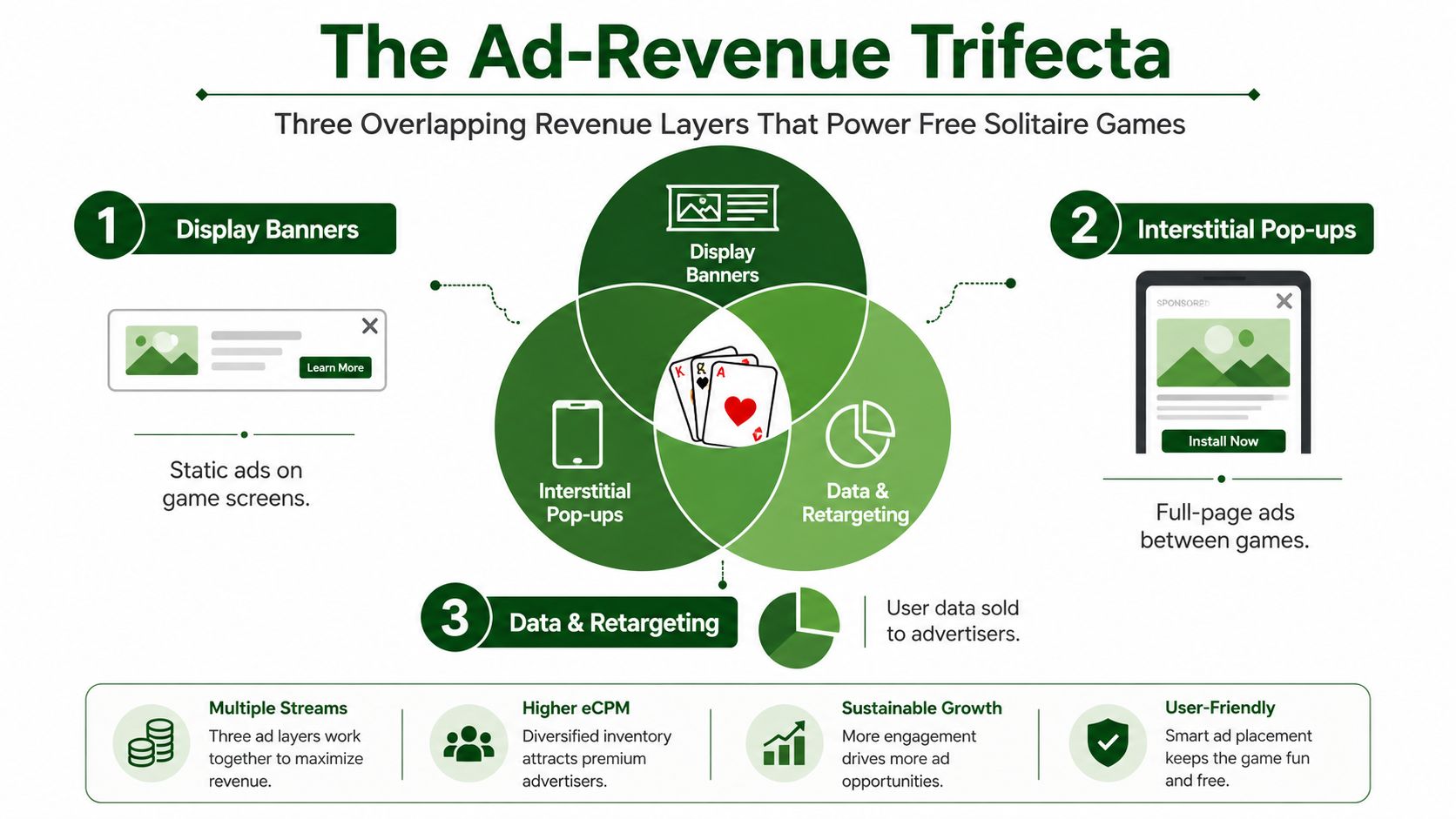
The three layers behind a free deal
- Display banners: These occupy space around the cards and may load through programmatic advertising networks.
- Interstitial pop-ups: These interrupt the transition between games and often command the entire screen.
- Data and retargeting: Trackers can help advertisers decide which message to show, rather than serving every player the same creative.
The technical cost is visible in loading time and browser work. One controlled benchmark measured a website with unblocked ads at an average 3.8 seconds to load, compared with 1.89 seconds when ads were blocked, a 51% slowdown attributed to advertising-related network and execution overhead, according to Opera's benchmark report. Another independent study found ad blocking reduced loaded domains to 60% of the no-blocker baseline and reduced browser workload measures across pages, as detailed in the ad-blocking measurement study.
Choosing solitaire without advertisements is therefore a deliberate counter-position. You're rejecting a system that treats interruptions, extra requests, and targeted promotion as an acceptable part of casual play.
Three Main Paths to Ad-Free Solitaire
There are three sensible ways to remove ads. None is universally best, because each solves a different problem.
Premium apps offer the most complete package. A paid tier in a product such as the Microsoft Solitaire Collection can remove advertising while preserving polished controls and adding features such as themes, daily challenges, or cloud synchronization. The trade-off is straightforward: you spend money, and you may need an account. You're also trusting the app provider with whatever information its account and telemetry systems collect.
Browser-level blocking costs less and works with games you already use. Desktop extensions such as uBlock Origin, built-in protections in Brave, Safari's tracking controls, and DNS filtering can remove many ad requests before they reach the page. Setup takes more effort, some filters can interfere with legitimate game scripts, and blocking ads doesn't guarantee that the site itself collects no data.
Ad-free browser sites and offline games keep the interface simple. A browser site can start immediately without a download, while a local application removes the advertising network from the play session entirely. The trade-off is trust for browser sites and reduced connectivity for offline software. You may lose synchronized statistics, online leaderboards, or rotating challenges when the game can't reach its server.
Comparing the Three Paths to Ad-Free Solitaire
| Path | Cost | Setup Effort | Offline Support | Privacy | Feature Depth |
|---|---|---|---|---|---|
| Premium app | Paid, depending on the product | Low after installation | Often available, but verify before buying | Account and telemetry policies apply | Usually broad |
| Browser or DNS blocking | Usually free, tools may require configuration | Moderate | No, it modifies online play | Blocks many third parties, not necessarily site-level collection | Depends on the original game |
| Ad-free browser site or local play | Often free for browser play, software varies | Low for browser play, moderate for local software | Local software supports it; browser access depends on caching | Depends on the site or app policy | Browser features vary, local apps can be focused |
My recommendation is simple. Start with an ad-free browser option if you want speed and no commitment. Choose a premium app if you need a dependable mobile experience with richer features. Go offline if privacy and silence matter more than online competition.
Play Solitaire Gaming as an Instant Ad-Free Option
For a casual browser player, Play Solitaire Gaming takes the shortest route from “I want a game” to an active table. The homepage uses a green-felt presentation and a variant picker that includes Klondike, Spider, FreeCell, Pyramid, and TriPeaks, along with other classic options. There's no download or signup requirement for the basic start.
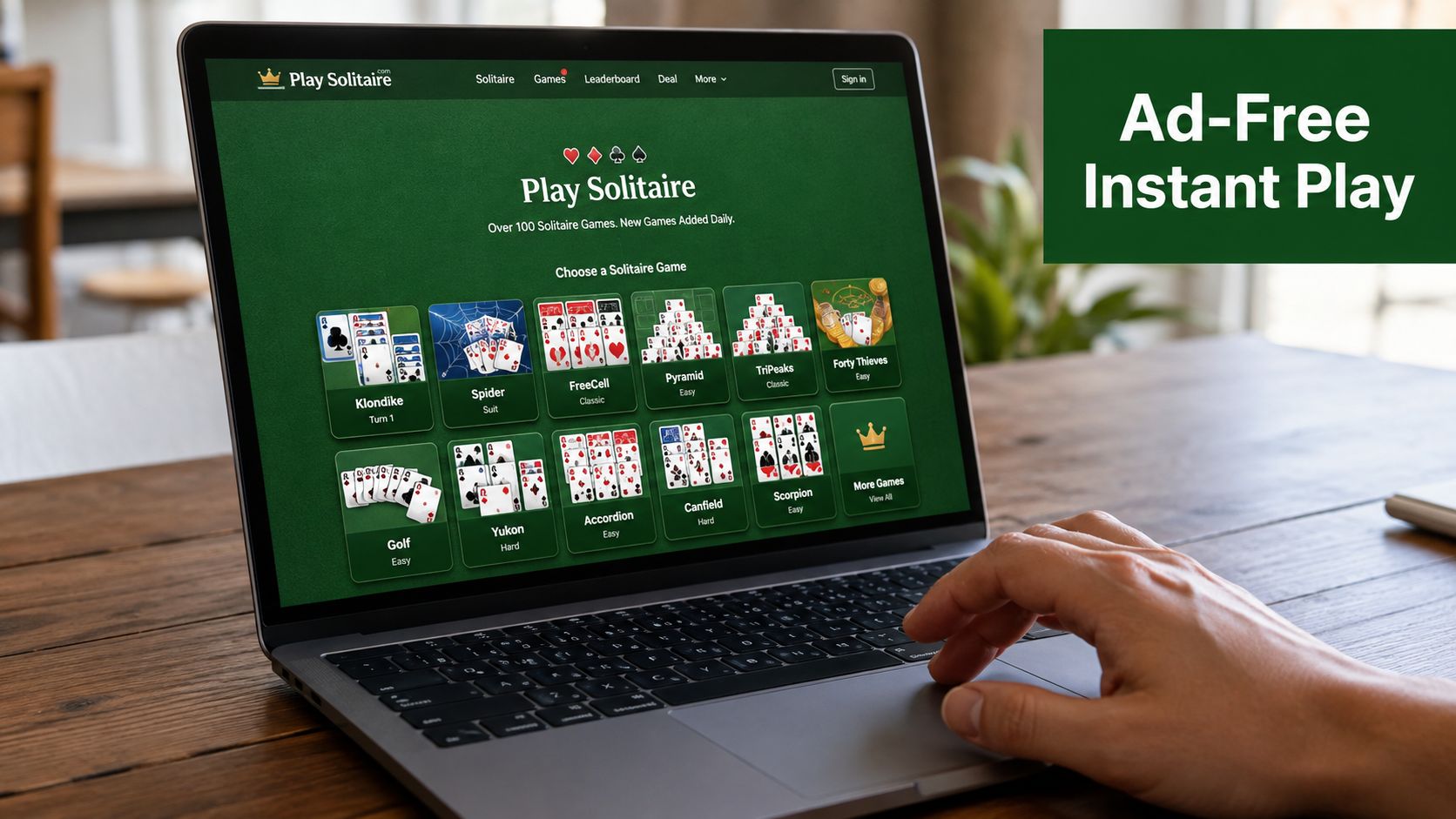
Choose a variant, then use drag and drop to move cards. One-tap auto-move handles cards that clearly belong on a foundation, while unlimited undo lets you test a decision without turning one mistake into a dead deal. That combination suits relaxed play, but it's also useful for learning because you can examine the consequences of a move instead of restarting immediately.
The daily-challenge card adds structure for players who want a reason to return. Three-strike scoring and global leaderboards create competition without forcing a login wall at the start. Optional Google or Apple sign-in enables private cloud synchronization for statistics, so you can decide whether cross-device continuity is worth creating an account.
What to check before you settle in
- Variant choice: Use Klondike for the familiar stock-and-tableau rhythm, FreeCell for open planning, or Spider when you want longer suit-based sequences.
- Controls: Test auto-move and undo before beginning a serious challenge. Responsive controls matter more than decorative themes.
- Account boundary: Play first without signing in. Add synchronization only if you need your results on another device.
- Display preferences: Use the dark-mode toggle if a bright table feels tiring during evening sessions.
- Hardware fit: A lighter page has fewer advertising requests and fewer competing scripts, which can make startup and card movement feel steadier on older phones and modest laptops.
The important distinction is not that this option has every possible premium feature. It's that the core activity begins without making you watch an ad, dismiss a promotion, or hand over account details before the first deal.
Blocking Ads at the Browser and Device Level
Ad blocking works best when you treat it as a controlled setup rather than a magic switch. On desktop Chrome, Firefox, or Edge, install uBlock Origin from the browser's official extension store, open its dashboard, and review the enabled filter lists. EasyList and EasyPrivacy are common starting points for advertising and tracking filters.
The exact interface can change, so verify that the extension is active on the solitaire page. If a banner remains, use the extension's element picker or add a site-specific filter carefully. Don't block broad page elements blindly, because a filter that removes an ad container can also remove the game board or its controls.
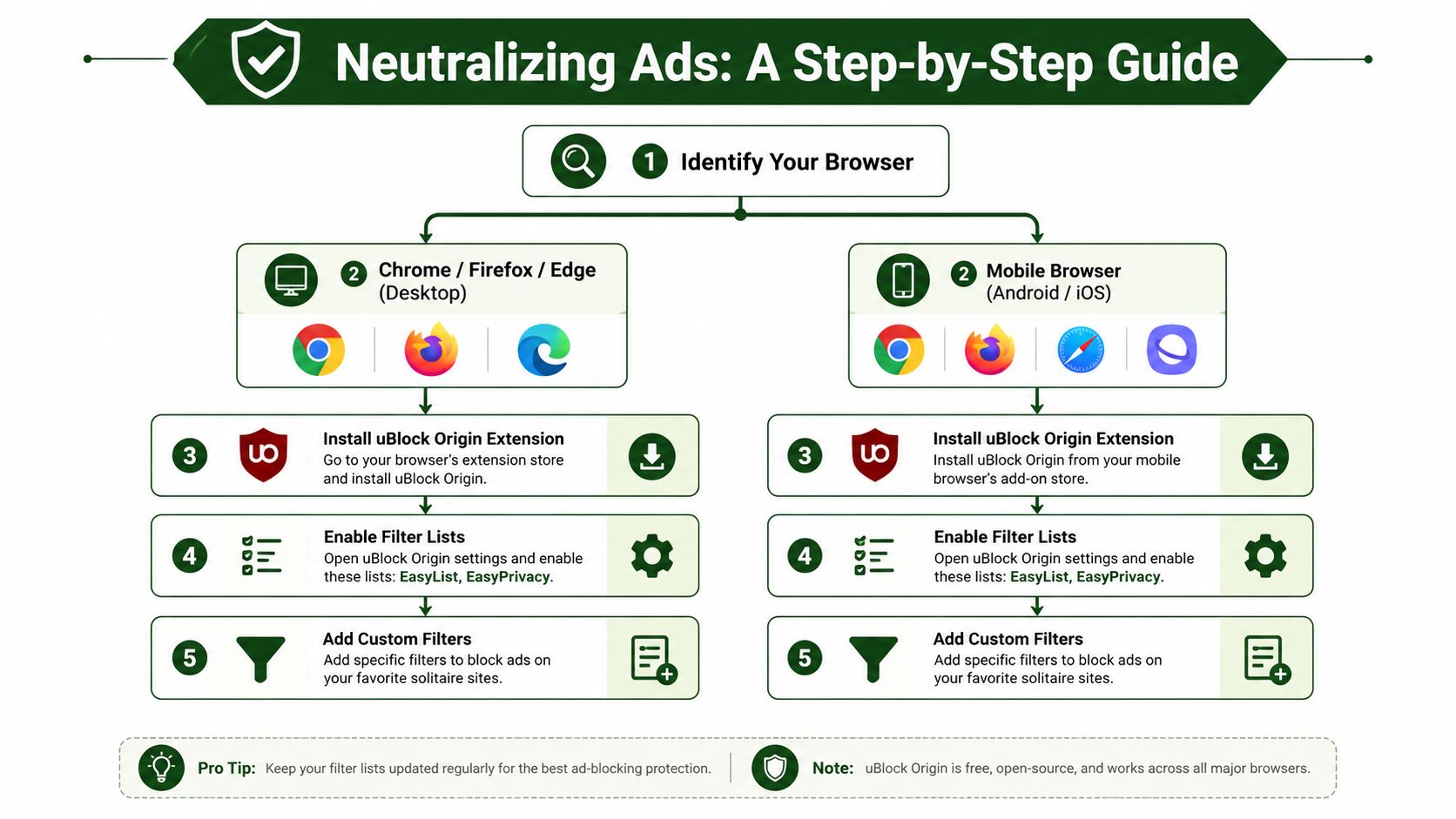
Use built-in protection where possible
Safari's Cross-Site Tracking Prevention limits certain forms of cross-site tracking without requiring an extension. Brave's built-in Shields can block many ads and trackers as part of the browser itself. These options are convenient, particularly on devices where extension support is restricted, but they still may affect scripts a game needs to load.
DNS-level tools such as NextDNS or AdGuard Home apply filtering beyond one browser. That makes them useful for household or whole-device coverage, but they can also block legitimate services that a game relies on. DNS filtering can't inspect every page behavior, so it should complement, not replace, a careful privacy review.
Troubleshooting rule: Restore the game first, then tighten the filters. A working solitaire board is more useful than a perfectly empty network log.
If the game breaks, work through this order:
- Whitelist the trusted site: Temporarily allow the domain and reload the page.
- Clear site data: Remove cookies and cached files for that site, then start a clean session.
- Test a normal window: Incognito or private mode may disable extensions unless you explicitly allow them.
- Check scripts: If the board is blank or cards don't move, a filter may have blocked a required asset.
- Re-enable selectively: Keep general ad and tracker lists active, then add only the narrow exception the game needs.
Privacy Trade-offs You Should Know About
An ad-free screen does not guarantee a private game. A browser site may still record anonymous play statistics, usage events, or technical details. A paid app can remove advertisements while linking activity to an email address, device identifiers, crash reports, or synchronization data.
Cloud sync makes the exchange clearer. Signing in may store win rates, streaks, timestamps, and device associations so progress appears on another screen. That convenience costs some control over where your play history goes. Review the Play Solitaire Gaming privacy policy before creating an account, and check whether the service explains retention, sharing, and deletion.
Third-party analytics, session-replay tools, and advertising cookies can load beside ordinary game files, even when a page displays few or no ads. The privacy discussion from PCMag explains why tracker blocking matters beyond removing visual distractions.
Privacy trade-offs across ad-free solitaire paths
| Path | Account required | Data exposure to check | Practical response |
|---|---|---|---|
| Ad-free browser site | Not always | Privacy policy, cookies, and browser requests | Avoid signing in unless sync matters, and use tracker protection |
| Premium app | Often for sync or purchases | Analytics, crash reports, advertising disclosures, and permissions | Use a separate email and deny permissions the game does not need |
| Browser blocking | No separate game account | First-party collection can remain after third parties are blocked | Pair filtering with private browsing and a site-level review |
| Offline local software | Usually no | Installation source and any later network activity | Choose reputable software and keep the app offline |
Match the privacy setup to what you are willing to give up. A separate email limits the link to your primary identity, while disabling personalization reduces some account-based profiling where those controls exist. Review Android or iOS permissions before installing, especially for a simple card game.
For the strongest boundary, use local play and keep the game off the network. You give up cloud sync and some convenience, but your solitaire history stays on the device.
Going Fully Offline With Local Solitaire Play
Offline solitaire eliminates the advertising problem by eliminating the connection that delivers advertisements. That makes it the cleanest option for a player who values permanent silence, but it also removes features that depend on a server.
Start with the software already on your computer. Search the Start menu on Windows for Solitaire and check whether the installed version works without an active connection. Microsoft Solitaire Collection has moved toward an ad-supported model in some configurations, so don't assume that a familiar name means an uninterrupted offline experience. On macOS, inspect the games available on the machine rather than relying on a browser tab.
Dedicated software gives you more control. Microsoft Solitaire offline options, paid MobilityWare versions, and open-source desktop projects such as Aisleriot and PySolFC represent different balances of polish, cost, and setup. Download only from a source you trust, scan installers, and test the game before disconnecting.
Turning browser play into a local shortcut
A Progressive Web App can make a browser game feel more like a desktop or mobile application:
- Open the game in a supported browser while connected.
- Use the browser's install or “add to home screen” command.
- Launch it from the new icon and test the main game.
- Disconnect briefly to see which assets remain available from the cache.
Caching behavior varies by site and browser, so don't treat a PWA shortcut as proof of full offline support. If the game needs a server call for statistics, challenges, or authentication, those features won't work without a connection.
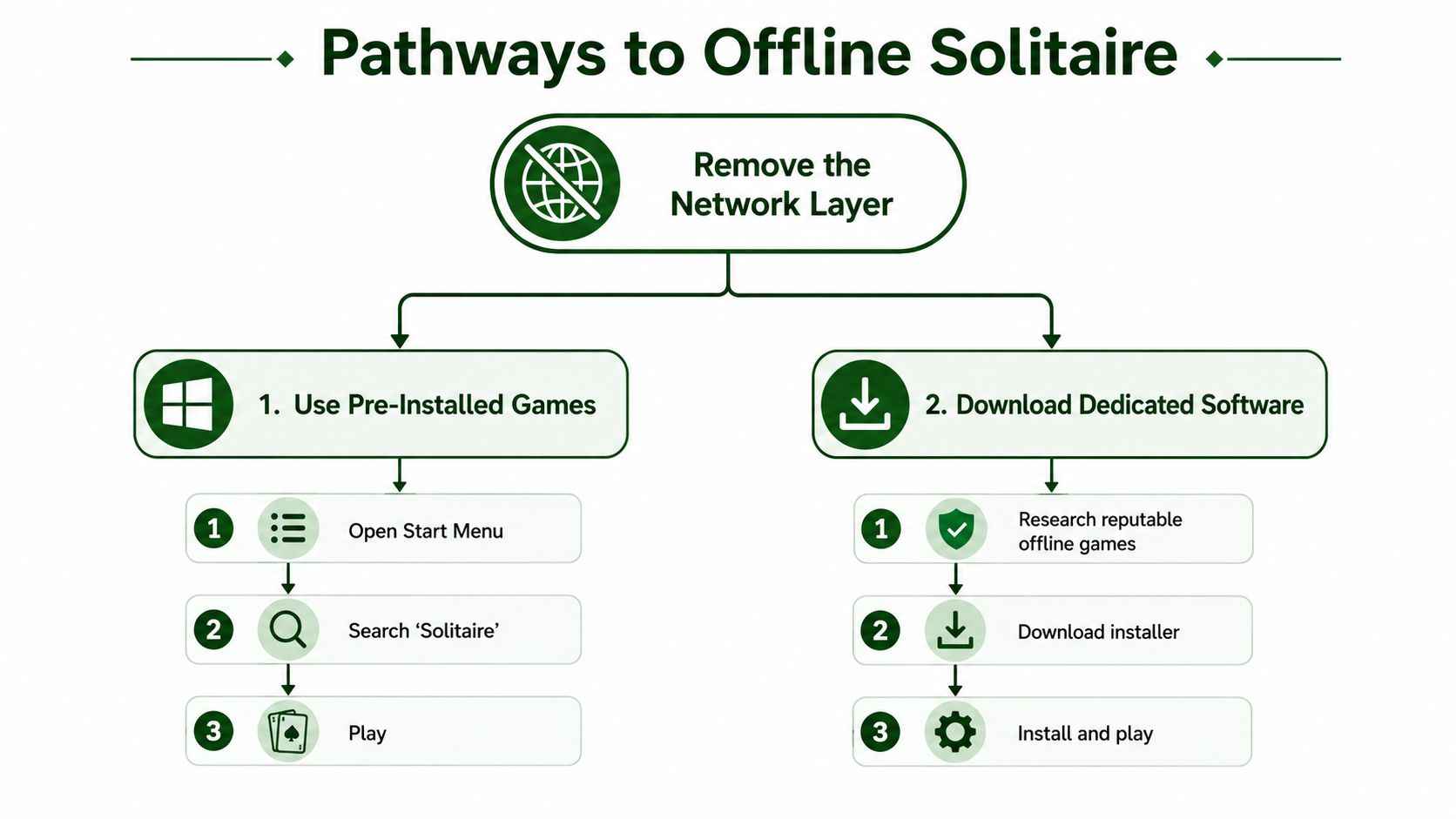
For Android-specific guidance, see this guide to free classic solitaire downloads. The trade-off remains clear: offline play sacrifices cloud sync, leaderboards, and daily challenges for a permanently quiet table.
Choosing the Right Setup for the Way You Play
The right answer depends on how you play, not on which option has the longest feature list. A five-minute browser player needs immediate access and low friction. A commuter may prefer a paid app that behaves consistently without a connection. A privacy purist should accept more setup in exchange for tighter control.
| Play Style | Best Setup | Main Trade-Off |
|---|---|---|
| Casual browser player | Ad-free browser solitaire | Depends on the site's privacy practices |
| Mobile commuter | Premium ad-free app | Costs money and may require an account |
| Privacy-focused purist | Offline software, or a PWA with DNS-level blocking | Loses online features and requires more testing |
| Competitive daily player | Ad-free browser play with optional sync | Keeps online features but involves a privacy decision |
If you want a fast, casual hand, use a normal browser and avoid installing anything. If you need reliable travel play, pay for an app whose offline behavior and privacy policy are clear. If you want maximum control, install local software, restrict network access, and give up leaderboards without regret.
Solitaire without advertisements isn't one product category with one perfect solution. It's a setup decision. Pick the trade-offs you can live with, then stop accepting interruptions you never wanted in the first place.
Play Solitaire Gaming offers instant browser play across classic solitaire variants with no downloads or signups required for the basic experience. Visit Play Solitaire Gaming, choose a game, and start your next quiet hand without an advertising interruption.
Ready to play?